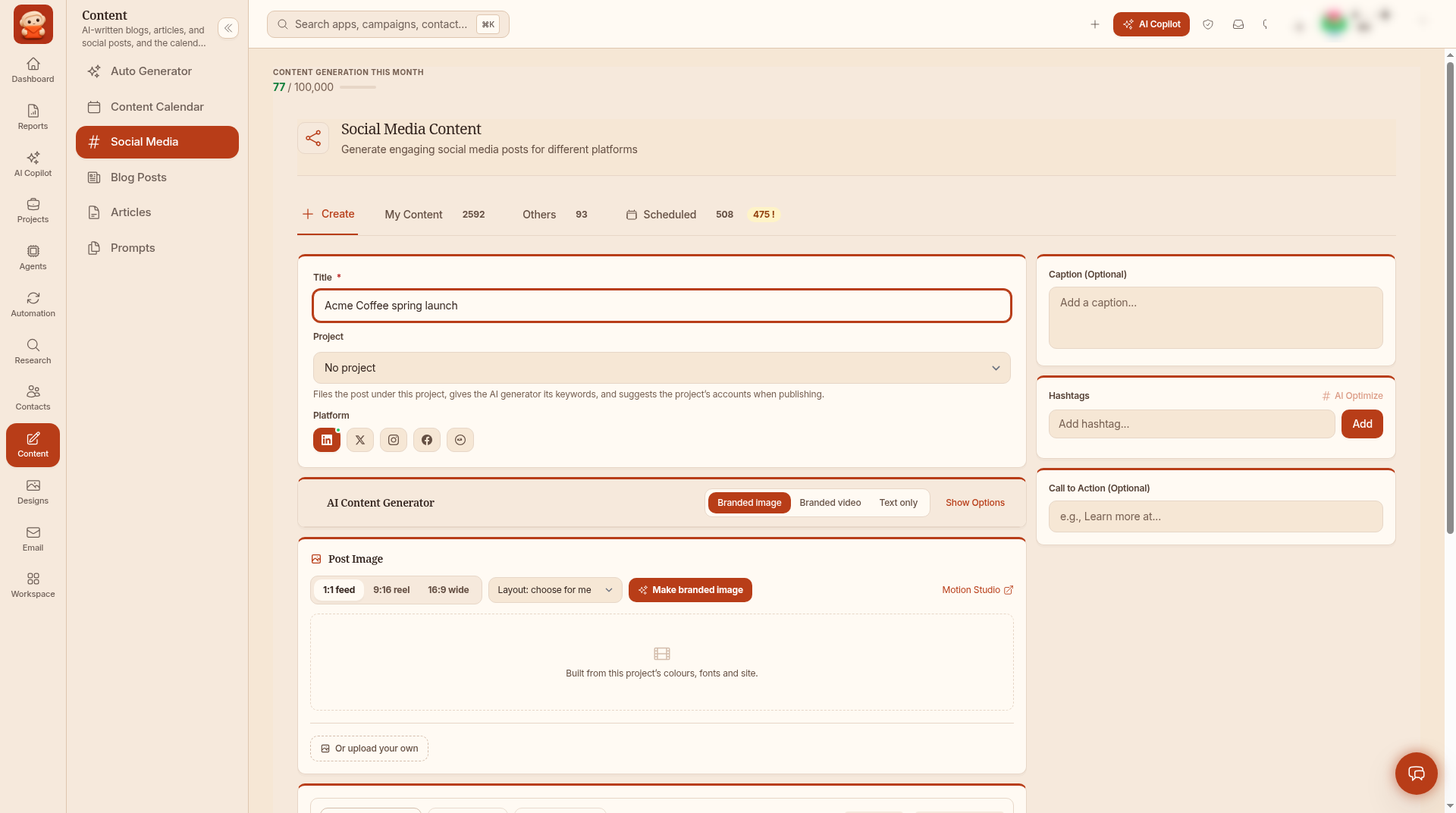
Open Content → Social Media, choose the + Create tab (or Create New), pick X (Twitter), LinkedIn, Facebook, or Instagram, add the topic, optional hashtags, and tone, then click AI Generate. OutreachBox returns a draft sized for that platform. Edit the text, copy it out, or schedule it. This guide is only about social drafts—not keyword research, site crawls, or cold email.
What this page is / is not
- Is: a walkthrough of the Social Media generator under Content.
- Is not: an SEO end-to-end guide (see How to do SEO with OutreachBox for projects, keywords, and the crawler). OutreachBox sends outreach by email; social tools here help you write posts, not run LinkedIn/Facebook outbound sequences.
Before you draft
- Pick one platform and one reader action (visit a guide, reply, save the post).
- Have the source material ready (blog URL, product note, or launch line).
- Prefer one concrete detail over empty claims.
Steps
- Go to Content → Social Media.
- Open the + Create tab (or click Create New).
- Select the platform: X, LinkedIn, Facebook, or Instagram.
- Fill in:
- Topic — what the post is about.
- Hashtags — on or off / which set.
- Tone — e.g. professional, casual, or fun.
- Click Generate.
- Edit in place. Check links, names, and claims before anything goes public.
- Copy the text, or schedule it if scheduling is available in your workspace. For recurring drafts, see the Auto Generator guide.
Platform sizing (no performance claims)
OutreachBox shapes the draft toward each network's usual length and style (short on X; longer on LinkedIn; etc.). Always confirm the final character count in the editor before publishing—limits change and the UI is the source of truth.
Worked example (process only)
You published a technical how-to on your site. Generate a LinkedIn post that states one practical takeaway and links to the how-to. Generate a shorter X post on the same takeaway. Do not paste the LinkedIn text unchanged onto X.
Quality check
- Replace vague praise with one specific observation from the source piece.
- Drop hashtag piles; keep a small, relevant set.
- Confirm you are allowed to publish the claim (product, pricing, customer).
- OutreachBox pricing if you mention plans on this page: Free plan; paid from $99/month (Pricing).
Frequently Asked Questions
Which platforms can I draft for?
X, LinkedIn, Facebook, and Instagram, via Content → Social Media → + Create, then AI Generate.
Does this send posts to my social accounts automatically?
Follow what the current OutreachBox UI offers for copy/schedule. This article does not document third-party social inbox APIs. Outreach sending remains email.
Is this the same as the SEO guide?
No. The SEO with OutreachBox guide covers projects, keywords, crawling, and on-site content. This page only covers social post drafts.
Can I reuse blog copy as a social post?
Yes as a starting point—regenerate or edit per platform instead of posting the same text everywhere.
How do I keep a cadence?
Batch drafts here, then plan review/publish tasks on the Board or with a content calendar workflow.
Related guides
- How to build a content calendar with OutreachBox
- How to automate content creation with the Auto Generator
- How to write long-form articles with AI
- How to do SEO with OutreachBox — a different workflow (projects, keywords, and the crawler), not social drafts.
Draft the social copy here, then publish on each network in its native tool. Start free: Free plan; paid from $99/month.